



Laptop Battery Replacement Cost Hyderabad Guide
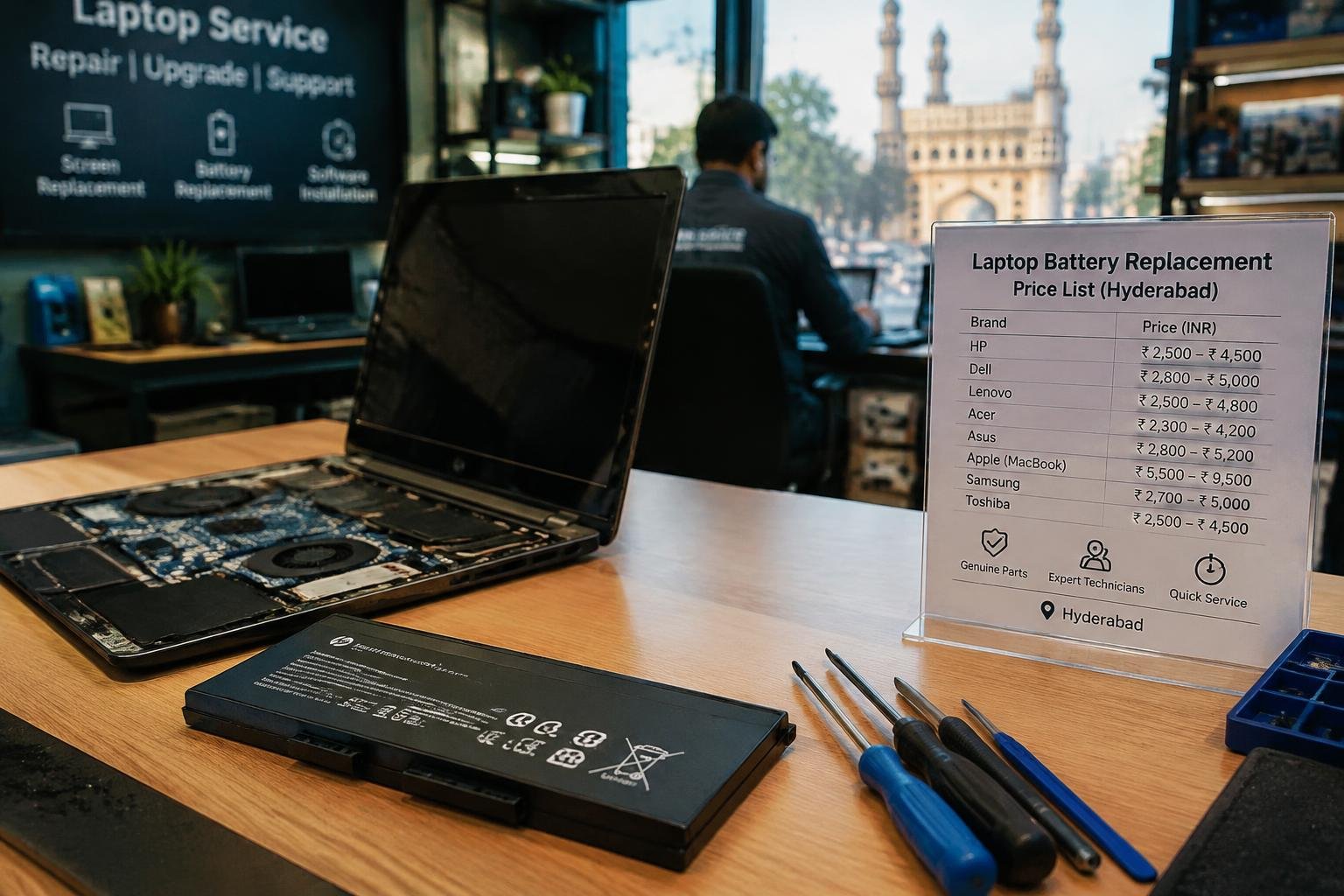
A laptop that loses charge quickly or shuts down while unplugged often needs a battery inspection, not a new charger. In Hyderabad, your replacement cost depends on the laptop model, battery type, and whether the part is original or compatible. Knowing these details helps you assess a repair quote, especially for sealed models that require case disassembly.
Key Takeaways:
- Laptop battery replacement costs in Hyderabad depend on the laptop brand, model, battery capacity, and whether the part is original, OEM, or compatible.
- Battery prices and labour charges are usually quoted separately, so ask for an itemised estimate that names the battery part number and installation fee.
- Service centres typically fit manufacturer-specified batteries, while independent repair shops may offer OEM or compatible alternatives with different warranty terms.
- A battery that drains quickly, fails to charge, or causes unexpected shutdowns may need replacement; a technician can check battery health and the charging circuit before fitting a new pack.
- Before approving the repair, confirm the warranty period, turnaround time, and whether the old battery will be returned, especially for sealed laptops that require case disassembly.
Laptop Battery Replacement Costs in Hyderabad
Hyderabad service centres quote battery replacement in rupees, with the total varying by laptop model and the battery supplied. A basic estimate gives you a useful starting point, but the written quote should identify whether the part is original equipment, compatible aftermarket, or refurbished. For a laptop used for office work, a standard compatible pack often costs less than a manufacturer-branded unit, while the final amount should clearly separate the battery price from fitting charges.
Cost ranges by laptop brand and battery type
For common Dell, HP and Lenovo models, compatible aftermarket batteries generally fall in the lower price band, while original batteries are usually priced higher. Apple MacBook replacements often cost more because the battery is model-specific and fitting can involve opening a tightly assembled case. Gaming laptops and premium business models also use higher-capacity or less common packs. In Hyderabad, expect broad quotes rather than one fixed brand rate, since a battery for a particular model may differ from another in the same series.
What a replacement quote typically includes
Before approving a job, look for the battery’s part number, stated capacity, warranty period and whether the quote includes installation. A service-centre estimate commonly combines the battery and technician’s labour, with applicable taxes shown separately or included in the total. Ask whether diagnostic testing and safe disposal of the old pack are covered. A clear written quote should also specify the warranty terms for both the replacement battery and the fitting work.
| Battery or service item | Typical quote detail | Cost position |
|---|---|---|
| Compatible aftermarket battery | Part number and capacity | Generally lower |
| Original manufacturer battery | Brand and model compatibility | Generally higher |
| Battery installation | Labour charge | May be listed separately |
| Warranty and testing | Coverage period and checks | Confirm in writing |
Factors That Affect the Price
Replacement quotes vary because the battery is only one part of the job. Your laptop’s construction determines how the old pack is removed, while the replacement’s source and the provider’s service terms shape the parts and labour charges. In Hyderabad, two laptops needing a similar battery capacity can still receive different quotes if one uses a common removable pack and the other requires opening the case and disconnecting internal components.
Laptop model, battery capacity, and availability
Your exact model number, usually printed on the underside or shown in BIOS, identifies the compatible battery more reliably than the laptop’s product family name. Higher-capacity packs often cost more because they contain additional cells, while thin models may use a custom-shaped battery that fits a specific chassis. Availability also matters: a battery stocked locally is generally easier to source than an older model’s pack, which may require a special order from a supplier.
Genuine, compatible, and refurbished battery options
Battery type affects the parts charge and the coverage attached to it. A genuine pack is supplied under the laptop manufacturer’s branding, while a compatible replacement is made by a third-party manufacturer to fit the specified model. Refurbished batteries are previously used packs that have been restored, so their condition and remaining capacity depend on the cells and testing. Check that the quoted part matches the model’s voltage, connector, and battery identification code.
Labour, warranty, and service-location charges
Labour depends on how the battery is installed. A removable pack usually takes less work than an internal battery beneath a glued or screwed base, where the technician must open the casing and reconnect cables without damaging nearby components. The quote may also include diagnostic checks or a service warranty covering the part or installation. A doorstep visit in Hyderabad can carry a separate call-out charge, unlike service completed at a workshop.
- Ask whether the quote includes GST and the battery’s fitting charge.
- Request the replacement part’s model code on the invoice.
- Confirm whether the technician returns the old battery.
Types of Laptop Battery Replacements
Replacement options differ by battery source, how the pack fits inside your laptop, and who performs the installation. Each combination affects the parts supplied, the work involved, and the service terms you receive in Hyderabad. A sealed ultrabook, for instance, requires a different repair procedure from a model with a slide-out battery. The distinctions below describe the main parts and service arrangements, including what you can expect during a standard replacement appointment.
| Option | What you receive | Typical service detail |
|---|---|---|
| Original-equipment battery | Manufacturer-specified replacement part | Part compatibility tied to the laptop model |
| Compatible battery | Third-party pack designed for the model | Specifications and warranty vary by supplier |
| Removable battery | External pack fitted by its latch or bay | Usually requires no case disassembly |
| In-built battery | Internal pack connected inside the chassis | Bottom cover removal is generally required |
| Repair service | Battery supplied and fitted by a service provider | Terms depend on the centre and part |
Original-equipment and compatible batteries
Original-equipment batteries follow the laptop maker’s specifications for connector type, voltage, capacity, and pack shape. You usually obtain one through the manufacturer or its authorized parts channel, with warranty terms linked to that seller. Compatible batteries come from third-party manufacturers and are built for named laptop models, but cell quality, capacity, and protection circuitry differ across brands. Check the exact model number printed on your old pack, such as a Dell battery part code, before ordering either type.
In-built and removable batteries
Removable batteries sit in an external bay and release through a latch, so you can take the pack out without opening the laptop. In-built batteries are fixed beneath the bottom cover and connect to the motherboard with a cable, making replacement a technician’s task on many models. Slim Lenovo and HP laptops commonly use internal packs, while older business notebooks often have removable units. Internal service may also require disconnecting the charger and lifting adhesive strips around the battery.
Authorized service centres and local repair shops
Authorized service centres use manufacturer-approved parts and follow model-specific service procedures, with warranty coverage governed by the laptop brand’s terms. Local repair shops in Hyderabad often offer both compatible packs and replacement labour, and some can source original-equipment parts on request. Ask the technician to confirm the battery part number, installation charge, and written warranty before work begins. For an in-built pack, the service should include safe disconnection of the battery cable before the technician handles the motherboard.
Choosing a Replacement and Saving on Costs
Match the replacement to your laptop’s exact model and battery part number before accepting a price. A battery that fits the casing but uses an incompatible connector or voltage can cause charging faults. Ask for the quoted part’s manufacturer, condition, and warranty terms in writing, then check whether the price includes tax and any diagnostic fee. Those details make quotes from Hyderabad repair shops easier to assess on equal terms.
Tips for Checking Battery Quality and Warranty
Inspect the battery label for a compatible part number, stated voltage, capacity, and manufacturer details; vague packaging makes verification difficult. Ask whether the unit is new, refurbished, or an original-equipment replacement, and request a written warranty that specifies its duration and coverage for charging or early capacity failure. Keep the invoice, since warranty claims often require it. A clear label and a dated receipt give you a record of the exact part supplied.
Pros and Cons of Authorized and Local Services
Authorized service centres typically source parts matched to the laptop model and provide formal invoices, though their parts and labour quotes can be higher. A reputable local technician in Hyderabad may offer more choice in battery brands and lower labour charges, but quality and warranty terms vary by shop. Check the technician’s experience with your laptop series and confirm whether the warranty comes from the shop or the battery maker before choosing.
Questions to Ask Before Approving a Quote
Ask which battery brand and part number the quote covers, whether the part is new, and how long its warranty lasts. Confirm that the total includes labour, tax, and any diagnostic charge, and ask whether the shop will return your old battery. If a quote lists only “compatible battery,” request the manufacturer and capacity in writing. A detailed invoice should identify the laptop model, replacement part, warranty period, and final amount.
- Check whether the battery carries a BIS marking.
- Ask how the shop handles a battery that arrives with a damaged seal.
- Confirm whether the quote remains valid if the model number differs from your laptop label.
Battery Replacement: Step-by-Step
Before the laptop leaves the workbench, the replacement process should establish the fault, fit a compatible battery, and verify charging and discharge behavior. You can ask the technician to explain each stage and confirm that the operating system recognizes the battery after installation. A clear sequence also makes it easier to spot issues such as a loose connector, an incorrect battery reading, or a battery that fails to charge while the laptop is powered off.
Confirm battery health and laptop compatibility
Start with a battery health check in Windows Battery Report, a manufacturer diagnostic utility, or the laptop’s built-in UEFI test. The technician should compare the reported full-charge capacity with the design capacity and inspect for swelling, heat, or physical damage. Next, match the replacement to the laptop’s exact model or service tag, voltage, connector, and battery part number. A battery that fits the casing but has the wrong connector or electrical specifications is not compatible.
Replace the battery safely
Before opening the laptop, the technician should shut it down, unplug the adapter, and disconnect any accessible external battery. For an internal battery, the base cover is removed with the correct screwdriver, and the battery connector is detached before the retaining screws are taken out. A plastic spudger reduces the risk of shorting nearby components. The replacement is seated without bending its cells, then secured and connected before the cover is refitted.
Calibrate and test the new battery
After installation, check that the BIOS or operating system detects the battery and displays a plausible charge level. Charge it with the correct adapter, then run the laptop unplugged through normal tasks while watching for sudden percentage drops, shutdowns, or excess heat. A full charge followed by a controlled discharge can help the gauge report capacity more accurately; avoid repeated deep discharges. Finish by confirming that the laptop charges again and that the connector remains firmly seated.
| Stage | What is checked | Typical indicator |
|---|---|---|
| Diagnosis | Battery capacity and condition | Health report or diagnostic result |
| Compatibility | Model, voltage, connector, and part number | Specifications match the laptop |
| Installation | Connector, seating, and fasteners | Battery sits flat and is detected |
| Testing | Charging and unplugged operation | Stable charge readings and runtime |
Summing up
Your laptop battery replacement cost in Hyderabad depends on the model, battery type, and whether the quoted service includes fitting and warranty coverage. Ask the technician to confirm the part number, battery condition, labour charge, and warranty terms before approving the repair. After installation, check that the operating system recognises the battery and that charging works normally. A clear written quote from a Hyderabad service centre gives you a reliable basis for judging the final cost.
FAQ
How much does laptop battery replacement cost in Hyderabad?
Laptop battery replacement in Hyderabad can range from a modest charge for a common removable battery to a substantially higher cost for a model-specific built-in battery. The final quote depends on the laptop model, battery type and capacity, parts availability, warranty, and whether labour or service-location fees are included.
How long does it take to replace a laptop battery?
A straightforward replacement can often be completed during a repair visit, while a less common battery may take longer if it must be ordered. Built-in batteries can also require more disassembly than removable ones, so ask the service provider for a time estimate after they confirm the model and parts availability.
Is it safe to replace a built-in laptop battery at home?
Replacing a built-in battery at home can be safe for someone with the right tools and repair experience, but it carries a risk of damaging the battery or laptop. If the battery is swollen, stop using the laptop and arrange professional service, since puncturing or bending a lithium-ion battery can be hazardous.
What mistakes should I avoid when buying a replacement laptop battery?
Avoid choosing a battery based only on its price or physical resemblance to the old one. Check exact model compatibility, battery specifications, seller reliability, and written warranty terms, and confirm whether the quote includes fitting and testing before approving the purchase.
Can a laptop battery be repaired instead of replaced?
In most cases, a laptop battery with worn-out cells is replaced rather than repaired. If the battery is not charging, first ask for a diagnosis, since a faulty charger, charging port, or power-management issue can produce similar symptoms and may not require a new battery.
Is laptop battery replacement in Hyderabad worth it for an old laptop?
Replacement can be worthwhile if the laptop still meets your needs and the battery and service cost are reasonable compared with the value of the device. Consider the laptop’s overall condition, expected useful life, and whether other repairs are likely before spending on a new battery.
How can I check that a new laptop battery is working properly?
After installation, confirm that the laptop recognizes the battery, charges normally, and runs on battery power without unexpected shutdowns. Battery life varies with the model, battery capacity, workload, and settings, so compare its performance under your usual use and contact the seller if it behaves abnormally.
 Previous Post
 Next Post