



Laptop Screen Repair Cost in India – Price Comparison Guide
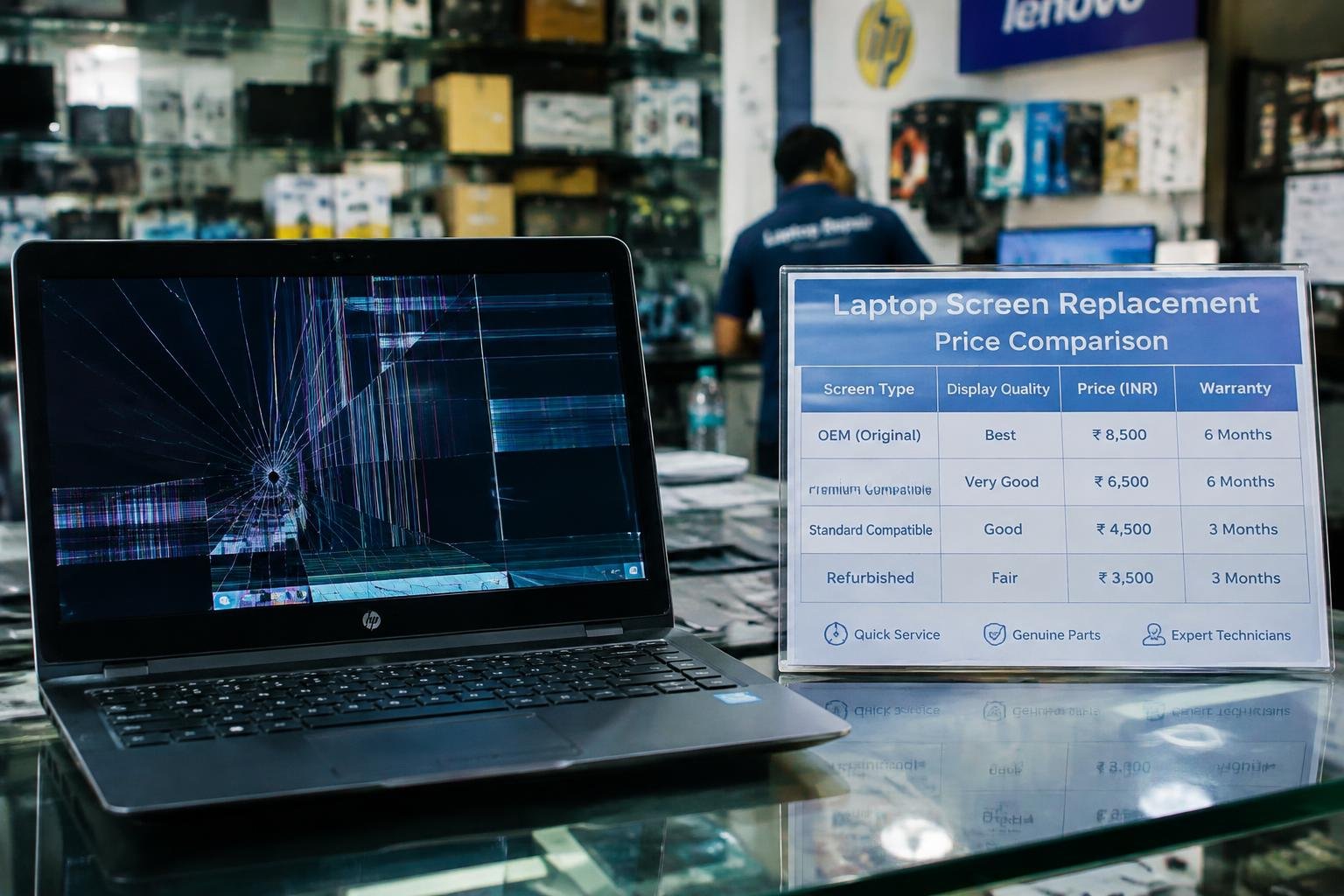
A cracked laptop display can turn a routine workday into a repair decision, with the final bill shaped by screen size, panel type, and laptop model. You’ll usually pay more for a high-resolution IPS or touchscreen panel than for a standard HD display, while labour and part availability also affect the quote. A technician typically confirms the panel specification from the laptop’s model number before replacement.
Key Takeaways:
- Laptop screen repair costs in India vary by brand, model, screen size and panel type. A standard HD panel and a Full HD IPS panel are different parts, even when both fit the same laptop.
- A cracked display usually requires a full panel replacement, while a loose display cable or faulty connector can cause flickering without damage to the screen itself.
- Touchscreen, high-refresh-rate and OLED panels generally cost more than basic LCD panels, and parts for premium or less common laptop models can be harder to source.
- A repair quote should separate the screen part, labour and any additional charges. Confirm whether the replacement is new or refurbished and whether the quoted panel matches the original resolution and connector.
- Warranty terms depend on the repair provider and replacement part. Ask for written coverage on the screen and fitting, along with an itemised invoice naming the laptop model and installed panel.
Types of Laptop Screens and Repair Options
Your estimate depends partly on the display panel fitted to your laptop and on whether the fault is limited to a replaceable component. Screen size, resolution, connector type, touch capability, and panel availability all affect which parts a technician can install. A cracked panel usually needs replacement, while a loose display cable or failed backlight may allow a narrower repair. The diagnostic result determines which option suits the symptoms.
LCD, LED, and OLED screens
LCD describes the display technology, while LED usually refers to the backlighting used in many modern LCD panels; these labels are not always separate screen categories. Your replacement must match key specifications such as dimensions, resolution, connector position, and refresh rate. OLED panels produce their own light and use a different panel design, so they are not interchangeable with standard LCD units. Touchscreen models also require a compatible digitiser and display assembly.
Screen replacement versus repair
Technicians replace the panel when glass or display layers are cracked, or when lines, dark patches, or widespread image loss indicate internal panel damage. A repair may be possible when the cause is a loose eDP cable, damaged hinge wiring, or a faulty backlight circuit rather than the panel itself. After inspection, ask whether the quote covers the panel alone or a complete display assembly, including the frame, webcam, and hinges.
- Match the panel’s connector and pin layout.
- Confirm whether the screen has a matte or glossy finish.
- Check that the replacement supports the original touch function.
Factors That Affect Repair Costs
Your final bill reflects the replacement panel, your laptop’s design, and the service provider’s labour and warranty terms. A compatible screen is not always identical to the original: connector placement, mounting points, and display specifications must match the machine. Service centres also differ in whether they source parts through authorised channels or independent suppliers, which affects both the quoted price and the coverage attached to the repair.
Screen size, resolution, and touch support
Screen size and resolution shape the panel’s price because larger displays and higher-resolution components generally cost more to source. A standard Full HD panel is typically less expensive than a 4K display designed for a premium laptop. Touch support adds another cost factor: on many models, the digitiser is bonded to the display, so you need a complete touch assembly rather than a basic LCD panel. Your model’s exact panel specification determines which part fits.
Parts quality, labour, warranty, and location
Parts quality influences both the quote and the repair’s warranty: an original manufacturer panel, a compatible aftermarket screen, and a refurbished part are priced differently. Labour depends on construction, since a technician may need to remove the bezel, disconnect the display cable, or separate an adhesive-bonded assembly. Your location also affects service charges and part availability, while an authorised centre may charge differently from an independent shop. Ask whether the quoted warranty covers the panel, fitting, or both.
| Cost factor | What affects the bill | Typical repair detail |
|---|---|---|
| Display specification | Size and resolution | Large or high-resolution panels cost more to source |
| Touch support | Digitiser and display assembly | Bonded components may require a complete assembly |
| Part quality | Original, aftermarket, or refurbished panel | Warranty coverage varies by part and supplier |
| Service provider | Labour, location, and sourcing | Bezel removal and cable access affect fitting work |
Laptop Screen Repair Prices in India
Across India, the quoted amount usually combines the replacement panel with fitting, and the panel type accounts for much of the difference. You will generally see lower prices for basic HD displays than for Full HD, touchscreen, high-refresh-rate, or OLED panels. Laptop category matters too: a mainstream model typically costs less to repair than a premium ultrabook or gaming laptop, where the display specification and assembly can be more specialised.
Cost ranges by screen type and laptop category
For a standard laptop, an HD LCD replacement commonly falls around ₹2,000 to ₹5,000, while a Full HD panel often costs ₹3,500 to ₹8,000. Touchscreen and high-refresh-rate displays tend to sit higher, and OLED replacements can reach ₹15,000 or more. Business ultrabooks, gaming models, and premium laptops often cost more than entry-level notebooks because their panels use thinner assemblies, higher resolutions, or specialised connectors.
Original, compatible, and refurbished screen prices
Original manufacturer panels usually carry the highest price, particularly for recent premium models, and retain the specified brightness, resolution, and refresh rate. Compatible panels are generally less expensive, but you should match the model number, connector, mounting points, and display specifications before installation. Refurbished screens often cost less than new panels, though their condition and remaining lifespan vary. A panel’s exact model code, such as LP156WFC-SPD1, narrows the price comparison.
- Panel size, measured diagonally, affects replacement cost.
- Touchscreen assemblies can include a separate digitiser layer.
- Some slim laptops bond the display glass to the panel.
Tips to Compare Quotes and Save Money
Start with written estimates that identify the screen type, parts, labour, taxes and any inspection fee. Match quotes against the laptop’s exact model number, since a standard LCD panel and a touch-enabled display are not interchangeable. Check whether each estimate includes the same scope of work, then compare the total payable amount rather than an advertised starting price. A quote that names the panel manufacturer and warranty period gives you more useful detail than a single lump-sum figure.
| Quote detail | What to verify | Why it matters |
|---|---|---|
| Screen specification | Panel type and model compatibility | Confirms the part matches your laptop |
| Price breakdown | Parts, labour, taxes and inspection fees | Reveals charges excluded from the headline price |
| Warranty terms | Coverage period and exclusions | Clarifies what happens if the replacement panel fails |
| Part description | Original, compatible or refurbished | Distinguishes options with different costs and specifications |
Questions to ask before approving a repair
Ask whether the quoted panel is original, compatible or refurbished, and request its manufacturer and part number in writing. Confirm that labour, taxes and any diagnostic fee are included in the total, and ask whether the quoted amount changes if the bezel or display cable also needs attention. Clarify the warranty’s duration, coverage and exclusions, including accidental damage. Before authorising work, request an updated estimate if the technician finds an additional fault.
Pros and cons of authorized and local service centres
Authorized service centres use brand-approved parts and provide service records that can matter if your laptop remains under warranty, but their pricing and parts availability are set by the brand’s service network. Independent local centres often offer compatible panels and more flexible quotes, though part quality, warranty coverage and technician experience vary. Check the written terms and ask who handles a warranty claim; an authorized centre’s brand-backed invoice differs from a local shop’s own parts warranty.
Choosing a Reliable Repair Service
For a laptop screen replacement, choose a provider whose claims you can verify and whose written terms are clear. A nearby authorized service centre suits warranty-covered devices, while an independent technician may offer more flexibility for older models. Ask for the estimate, parts description, and warranty conditions in writing before approving the job. Clear documentation gives you a record of the agreed service, including the laptop model and quoted screen specification.
Provider credentials, reviews, and parts transparency
Check whether the technician is authorized to service your laptop brand, especially if the device remains under manufacturer warranty. Read recent reviews for specific comments about screen repairs, communication, and how complaints were handled. Ask whether the replacement is original, compatible, or refurbished, and request the part number or a description of its panel type. A transparent provider will identify the supplier category on the invoice rather than listing only “LCD replacement.”
Repair warranty and data-safety checks
Before paying, get the warranty period and coverage in writing, including whether it applies to the replacement panel, installation defects, or both. Confirm exclusions such as accidental damage, pressure marks, and liquid exposure so you know what a later claim would cover. Back up important files and ask whether the technician needs your login password; screen replacement rarely requires access to personal documents. Keep the receipt with the device serial number and warranty terms.
- Verify the business address and GST invoice details.
- Ask for the replaced panel to be returned.
- Photograph the laptop’s exterior before handing it over.
Step-by-Step Screen Replacement Guide
During a screen replacement, you hand over the laptop, approve the proposed work, and receive the device after the repair shop completes its checks. The technician follows a controlled sequence, from confirming the display fault to reconnecting the replacement panel and testing the finished assembly. Your role is to provide the correct laptop model details, approve the work before installation, and review the device at collection. The stages below show what happens at each handoff.
Diagnosis, screen selection, and quote approval
First, the technician checks whether the fault comes from the LCD or OLED panel, display cable, or graphics output. A torch test, external monitor, and inspection of the bezel and hinges help distinguish a cracked panel from a connection problem. The laptop’s model and screen part number guide selection of a compatible replacement, including its connector and mounting points. Before installation, you receive the repair scope and quote; work proceeds after you approve it.
Replacement, testing, and post-repair checks
After shutdown and battery disconnection, the technician removes the bezel and releases the damaged panel from its brackets or adhesive. The display cable is transferred carefully to the replacement, which is secured before the bezel is refitted. Once the battery is reconnected, the technician checks startup, brightness controls, colour, viewing angles, and resolution. At collection, inspect the lid and bezel for gaps, then confirm that the image remains stable as you open and close the screen.
| Stage | What happens | Your part |
|---|---|---|
| Diagnosis | Technician identifies the failed display component | Share the model and describe the fault |
| Part selection | Replacement is matched to the panel and connector | Approve the repair scope and quote |
| Installation | Damaged panel is removed and replacement fitted | Leave the laptop with the technician |
| Testing and collection | Display functions and physical fit are checked | Review the screen and lid before leaving |
Final Words
Your laptop’s screen repair cost in India depends on the panel type, model, parts availability, and whether the damage is limited to the display or also affects the bezel or hinges. Before approving a replacement, ask for an itemized quote that separates the screen, labour, and warranty, then confirm the panel’s compatibility with your laptop’s exact model number. A written estimate makes differences between service centres easier to assess and clarifies what the quoted repair includes.
FAQ
How much does laptop screen repair cost in India?
Laptop screen repair in India can cost from a few thousand rupees to well over ₹20,000, depending on the screen and laptop model. Touchscreens, high-resolution panels, and OLED displays generally cost more, so confirm the exact part price and labour charge in a written quote.
How long does it take to replace a laptop screen?
A laptop screen replacement often takes a few hours if the correct part is in stock. It can take longer if the screen needs to be ordered, the laptop requires extra disassembly, or the technician finds additional damage during inspection.
Is it safe to use a laptop with a cracked screen?
A laptop with a cracked screen may still work, but continued use can worsen the damage or expose sharp glass, especially on touchscreens. Stop using it if the display flickers, shows exposed components, or the crack is spreading, and arrange a professional assessment.
What mistakes should I avoid when getting a laptop display replaced?
Avoid approving a replacement without checking the panel specification, total price, parts type, and warranty in writing. A screen that looks similar may not be compatible, and the cheapest quote may exclude labour or use a different quality of part than expected.
Can a laptop screen be repaired without replacing it?
Some display problems, such as a loose internal cable, may be fixable without replacing the screen. Cracked panels and many cases of internal display damage usually require a new panel, so a technician should diagnose the fault before quoting.
Is laptop screen repair worth it, or should I buy a new laptop?
Repair is often worth considering when the laptop otherwise meets your needs and the replacement cost is reasonable compared with buying another device. If it is older, has other major faults, or needs an expensive panel, compare the full repair quote with the cost of a suitable replacement.
Will replacing my laptop screen delete my files?
Replacing a laptop screen normally does not erase files because the data is stored on the internal drive, not the display. Still, back up important data before service and ask the provider to confirm whether any diagnostic or unrelated repair work could affect the drive.
 Previous Post