



Laptop Power IC Failure Symptoms Explained
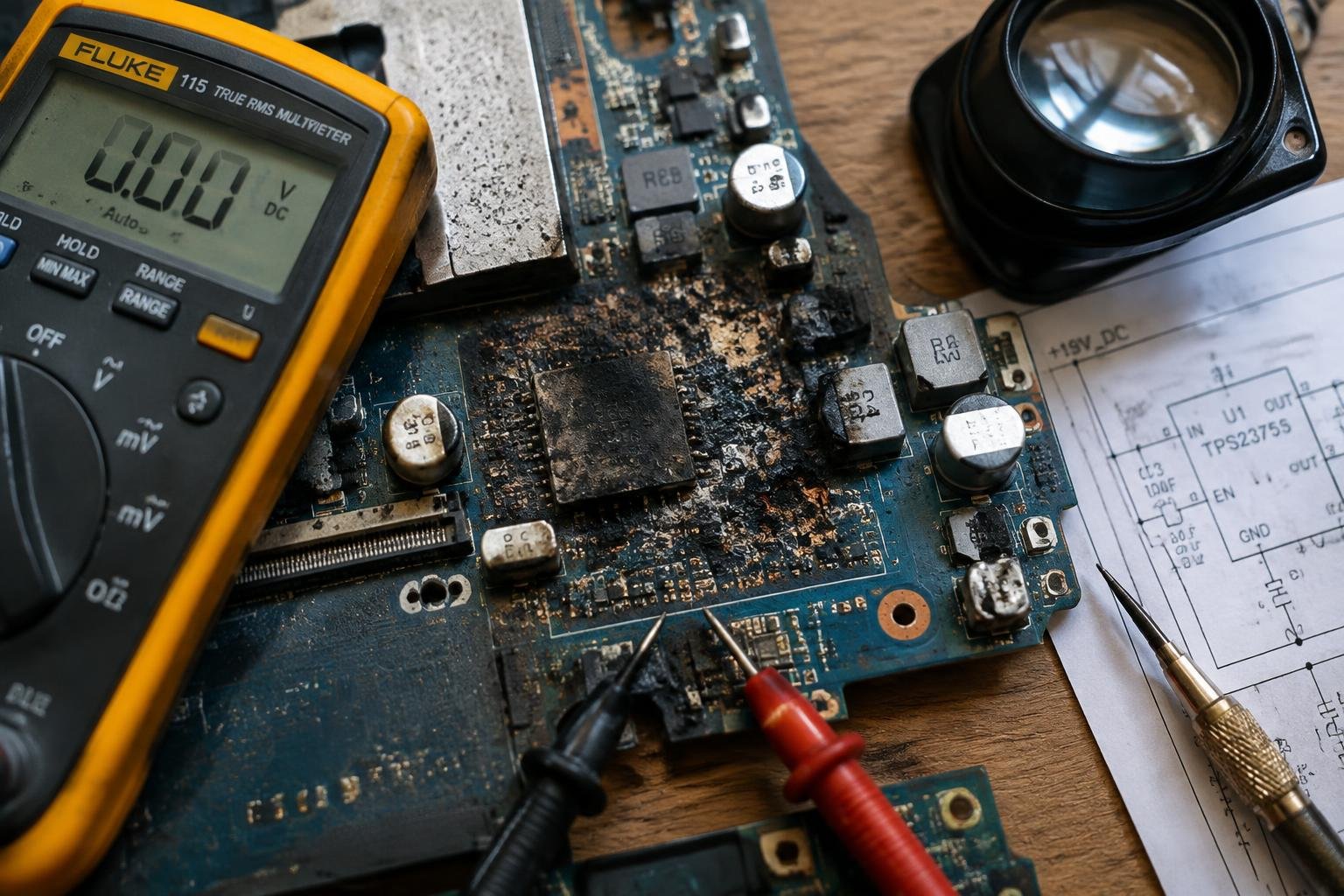
You notice your laptop won’t power on, even with the charger connected. No lights, no fan spin, just silence. These could be early signs of a failing power IC, a critical component regulating electricity across your motherboard. Understanding what you’re seeing-and why it matters-helps you diagnose the issue accurately and avoid costly missteps in repair.
Key Takeaways:
- A laptop that shows no signs of life-no lights, no fan spin, no response to the power button-often points to a failed Power IC, blocking power from reaching the motherboard.
- Burn marks, discoloration, or a slightly raised chip near the power jack or charging port can indicate thermal damage to the Power IC.
- Intermittent power behavior, such as sudden shutdowns or the laptop only turning on when the charger is held at a certain angle, may signal a cracked or poorly soldered Power IC.
- A working charger and charged battery that fail to power the system suggest the issue lies not with power input or storage, but with the Power IC’s ability to regulate and deliver voltage.
- Diagnostic tools like multimeters can detect abnormal voltage drops across the Power IC, helping confirm a malfunction without requiring immediate component replacement.
The Silent Evidence of a Dormant Machine
The Dormant Cooling Mechanisms
When your laptop fails to respond, the absence of fan activity is one of the first signs you’ll notice. You press the power button, yet no internal whirring follows, even after several seconds. The cooling system remains entirely inactive, offering no vibration or sound. This stillness indicates the power IC is not delivering current to initiate the boot sequence. Without that initial power surge, components like the CPU and GPU never reach temperatures requiring thermal management.
The Extinguished Status Indicators
Your laptop’s LED indicators provide immediate feedback about its condition, and when they remain dark, a deeper issue is likely at play. Even with the charger connected, no glow appears near the power or battery lights. These unlit markers confirm the circuit isn’t receiving or distributing electricity as expected. The complete lack of visual cues from the status LEDs points directly to a failure at the power delivery level, often centered on the power IC itself.
The Visual Scars of Electrical Trauma
Scorched markings on your laptop’s logic board are telltale signs of electrical trauma, often linked to power IC failure. You may notice darkened or blackened areas near the power circuitry, especially around voltage regulators and power delivery components. These blemishes result from excessive current or short circuits, generating intense localized heat. Unlike thermal damage from prolonged overheating, these marks appear suddenly and are usually confined to specific zones. Spotting them early can prevent further degradation of sensitive circuitry.
The Presence of Acrid Scorching
You might detect a sharp, lingering smell even before seeing visible damage. That acrid scent often lingers near components that have undergone electrical arcing or current overload. It’s caused by burnt insulation, vaporized solder flux, or degraded circuit board materials. When you open the chassis, this odor can lead you directly to the affected area. The smell is distinct from general dust burning and typically accompanies charring or bubbling on the board’s surface near the power IC.
Discolored Traces on the Substrate
Discoloration along the logic board’s copper traces can signal where excessive current once flowed. You’ll see amber, brown, or dark gray lines branching from the power IC toward connected components. These changes in color stem from oxidation or resin breakdown in the board’s substrate due to electrical stress. The pattern often follows the current path, making it a reliable indicator of fault origin. Such discoloration rarely appears randomly and usually clusters around power delivery nodes.
The Feverish Pulse of the Failing Chip
Heat radiates from a failing power IC in ways you can’t ignore. When the chip develops internal shorts due to manufacturing defects, voltage stress, or moisture exposure, it begins to dissipate excess energy as heat. You’ll notice this warmth concentrated near the motherboard’s power delivery circuitry, especially when the system is under minimal load. This thermal signature often precedes complete failure, offering an early clue that something beneath the surface is deteriorating.
Abnormal Warmth Near the Power Rail
You may detect a persistent hot spot around the power rail even during light usage or standby. This localized heating occurs because a shorted pathway inside the power IC forces current to flow where it shouldn’t, increasing resistance and generating heat. Unlike normal processor warmth, this sensation remains fixed in one area of the chassis and intensifies over time. Running your fingertip along the palm rest or near USB ports might reveal a subtle but consistent rise in temperature pointing directly to the fault.
Sudden Thermal Shutdowns
Your laptop cuts power without warning, not due to CPU overload but because the power IC exceeds safe thermal thresholds. These abrupt shutdowns happen mid-task, often with no prior lag or system strain, indicating the protection circuit has triggered. The root cause lies in the chip’s inability to regulate current efficiently, leading to rapid heat buildup. Each event reinforces the instability, narrowing the window between boot and collapse as the component degrades further.
The Interrupted Flow of Energy
When your laptop fails to respond to the charger despite a properly connected cable, the root cause may lie within the power IC. You observe no charging indicator, no system wake-up-just silence where there should be a response. This absence of energy transfer suggests the integrated circuit responsible for managing power intake has degraded or failed. Even with a functional battery and charger, the device remains unpowered because the internal gatekeeper of electricity no longer permits current to pass.
The Unrecognized Battery Connection
Your laptop displays a “plugged in, not charging” message even when the battery is fully seated and undamaged. This behavior indicates the power IC is no longer communicating with the battery circuit as intended. You might notice the system treats the battery as absent or foreign, despite no physical changes. The fault lies not in the battery itself, but in the IC’s inability to authenticate or regulate its connection, halting the charging process entirely.
Persistent Power Cycling Events
Your device repeatedly turns on and off when connected to power, unable to sustain a stable boot sequence. Each attempt ends in abrupt shutdown before the operating system fully loads. This erratic behavior often stems from a compromised power IC failing to regulate voltage delivery consistently. Without stable power distribution, the motherboard cannot maintain operation, trapping your system in a loop of failed startups despite correct peripheral connections.
The Binary Language of Distress
When your laptop refuses to power on normally, it often communicates its internal struggle through coded signals. These are not random glitches but deliberate patterns embedded in the hardware’s firmware, designed to speak when the screen cannot. The rhythm of blinking LEDs or bursts of beeps carries precise diagnostic meaning, revealing where the startup process fails. You’re not just observing malfunctions-you’re witnessing a silent language spoken by the machine in its most vulnerable state.
Interpreting Status Light Sequences
A steady pulse from your laptop’s power LED might seem innocuous, but irregular flashes follow strict manufacturer-defined codes. Two blinks followed by a pause could indicate memory initialization failure, while five rapid flashes may point directly to GPU or motherboard issues. You’ve seen these patterns before-short bursts, long pauses, repeated loops-all silently confirming something within the logic board isn’t responding. Each sequence is a sentence in the machine’s native dialect, and you’re now learning to read between the flickers.
Deciphering Audible Beep Alerts
Your ears become diagnostic tools the moment the first beep breaks the silence. A single tone may signal a successful POST, but multiple beeps in succession form a structured code tied to specific hardware faults. Three short beeps followed by a pause and then two more could mean RAM communication breakdown, depending on your system’s BIOS. These sounds aren’t errors-they’re messages. By listening closely, you translate what the display cannot show, catching the exact moment the power IC fails to relay voltage during boot negotiation.
Conclusion
You now recognize the signs of a failing laptop power IC: sudden shutdowns, failure to charge, or no power response despite a connected adapter. These symptoms point to an internal disruption often rooted in the power management circuitry. You’ve learned how physical damage, overheating, or electrical surges compromise this sensitive chip. Understanding these signals allows you to diagnose issues accurately and avoid misdirecting repairs. You’re better equipped to communicate with technicians or attempt targeted fixes, saving time and unnecessary expenses when addressing power-related failures.
FAQ
how much does it cost to fix a power ic on a laptop?
Repair costs typically range from $100 to $300 depending on the laptop model and labor rates. Higher-end models or complex logic board work may push the price toward the upper end, and some repair shops charge extra for diagnostic time.
can a laptop with power ic failure be fixed at home?
Yes, but only if you have advanced soldering skills and the right tools. Most consumer-grade laptops use BGA or QFN chips that require rework stations, making DIY repair risky without proper experience and equipment.
how long does it take to repair a failed power ic?
Most professional repairs take 3 to 7 business days, including diagnosis and rework. Turnaround depends on part availability and the technician’s workload, with some shops offering expedited service for an extra fee.
what happens if i ignore power ic failure symptoms?
The laptop will eventually stop powering on completely, and prolonged electrical faults may damage other components like the battery or charging circuit. In rare cases, sustained short circuits can pose a minor fire risk under extreme conditions.
are there alternatives to repairing the power ic on a laptop?
Replacing the logic board is the main alternative, though it’s often more expensive than IC repair. For older laptops, upgrading to a new device may be more cost-effective than investing in major hardware repairs.
 Previous Post