



Laptop Motherboard Short Circuit Causes
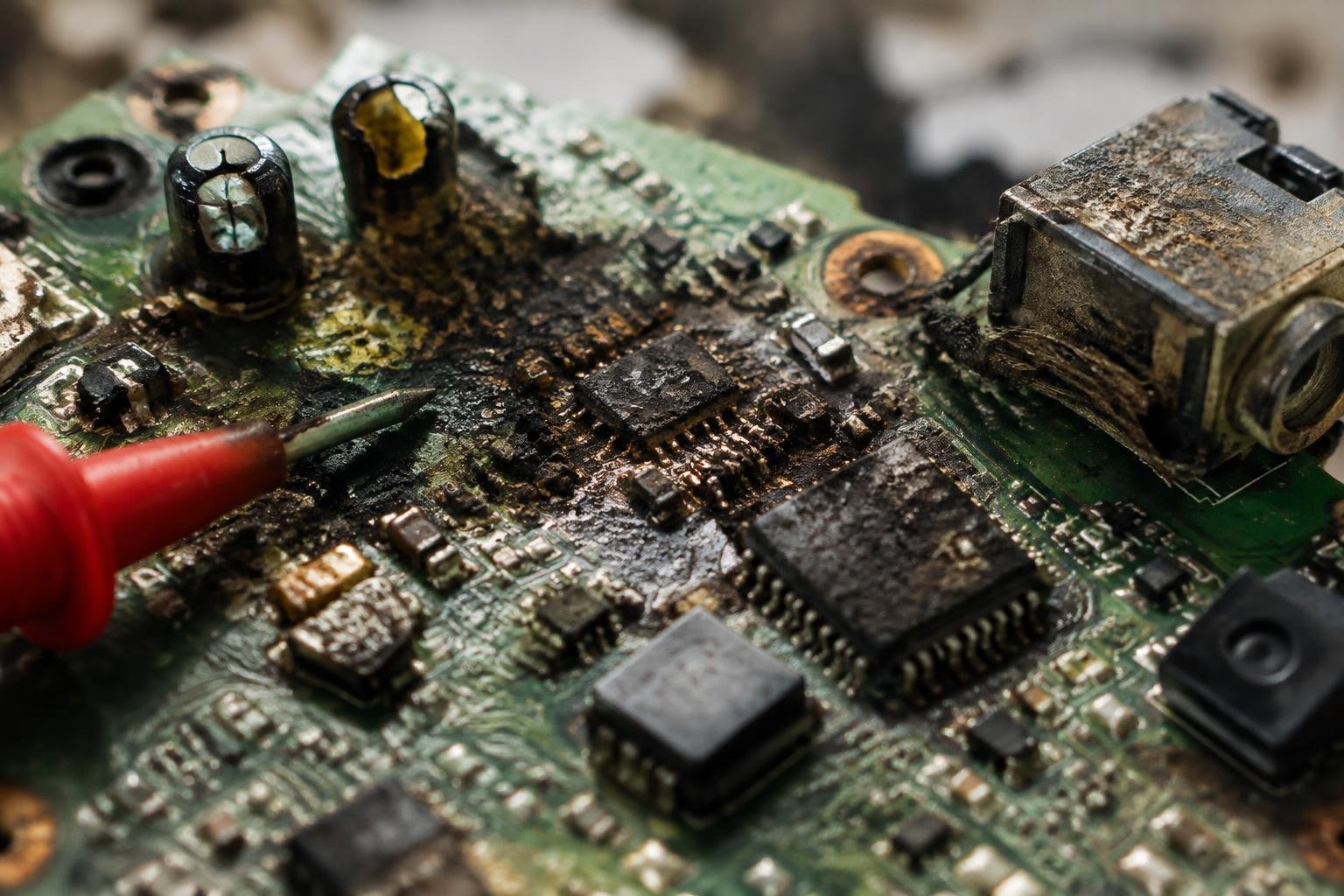
You face a sudden laptop failure, and a shorted motherboard may be the culprit. Multiple hidden factors can trigger this internal damage, often without warning. You encounter power issues, unresponsiveness, or even burning smells. Understanding what leads to these electrical faults helps you identify risks early and avoid irreversible harm to your device’s core system.
Key Takeaways:
- Liquid spills are among the most frequent causes of motherboard short circuits, with even small amounts of moisture creating conductive paths between delicate circuitry.
- Deteriorating internal components, such as swollen or leaking capacitors, can disrupt normal electrical flow and lead to localized shorts over time.
- Accumulated dust, metal fragments, or other foreign debris inside the laptop chassis may bridge connections on the motherboard, triggering a sudden failure.
- Power surges from faulty chargers or unstable electrical sources can overwhelm voltage regulators, causing permanent damage to the board’s power delivery system.
- Improper handling during DIY repairs-like using magnetic tools or failing to ground oneself-can introduce static discharge or misplaced screws that pierce critical traces.
The Treachery of Liquid Spills
Liquid contacting your laptop’s motherboard instantly risks a short circuit by forming conductive paths between tightly packed circuits. Even a small amount can bridge connections that are meant to remain isolated, triggering immediate malfunctions or sudden shutdowns. You may notice erratic behavior the moment the spill occurs-keys repeating, the touchpad freezing, or the system failing to power on. These symptoms stem from current traveling where it shouldn’t, overwhelming delicate traces and components.
The Morning Coffee Incident
Spilling coffee over your keyboard seems harmless at first, especially if the machine still runs after wiping the surface. But liquid seeps through key gaps and pools atop the motherboard below, creating invisible bridges between power and ground lines. The moment electricity flows through these unintended paths, components experience overload, often frying voltage regulators or memory chips. Even turning the laptop back on after such an incident accelerates damage due to residual moisture conducting current during startup.
Electrolytic Residue and Corrosion
Sugary or acidic drinks like soda or juice leave behind sticky residues that continue conducting electricity long after the initial spill dries. These deposits attract moisture from the air, maintaining a conductive film across circuit traces and solder points. Over hours or days, stray currents erode copper pathways and degrade signal integrity, leading to intermittent failures or complete board lockups. Cleaning with isopropyl alcohol immediately after exposure may reduce risk, but thorough disassembly is required to reach affected zones beneath shielding and components.
The Decay of Internal Components
Over time, the electronic components embedded within your laptop’s motherboard naturally degrade, even under normal operating conditions. Capacitors and resistors, made to regulate voltage and current, lose structural integrity as years pass. Heat cycles, minor power fluctuations, and material fatigue contribute to microscopic cracks and weakened solder joints. These aging elements can no longer handle standard electrical loads, increasing the risk of short circuits without warning.
The Burst Capacitor Clue
A bulging or ruptured capacitor on your motherboard often signals advanced internal decay. These small cylindrical components swell when their internal electrolyte breaks down, usually after prolonged exposure to heat and electrical stress. You might notice performance hiccups or boot failures before complete malfunction. Once a capacitor bursts, it can leave behind conductive residue that creates unintended current paths, turning a slow degradation into a sudden short circuit with little warning.
Transistor Fatigue and Breakdown
Transistors on your laptop’s motherboard endure constant switching and voltage changes, wearing down over thousands of operational hours. When these semiconductor devices fatigue, their ability to block or allow current diminishes, leading to leakage or complete failure. A single failed transistor can disrupt power regulation, creating localized shorts that compromise entire circuits. This type of failure often occurs silently, with symptoms appearing only after irreversible damage has occurred.
The Presence of Foreign Debris
Small conductive particles can wreak havoc on your laptop’s motherboard when they find their way into the internal circuitry. These fragments, often overlooked during routine maintenance, create unintended electrical pathways that lead to short circuits. Even microscopic metal shavings from manufacturing or previous repairs can bridge connections between closely spaced traces. You may not notice them during visual inspection, but under power, they allow current to flow where it shouldn’t, potentially damaging sensitive chips and power regulators.
Metallic Dust Accumulation
Over time, metallic dust from surrounding environments gradually settles inside your laptop’s chassis. This fine particulate matter, often generated by nearby mechanical systems or industrial activity, contains conductive elements that accumulate on circuit paths. When enough builds up, it forms a latent risk-bridging gaps between solder points or grounding planes. You might experience intermittent shutdowns or complete motherboard failure without realizing the culprit is this silent, invisible buildup compromising internal isolation.
The Dislodged Chassis Screw
A loose screw inside your laptop’s frame poses a direct threat to motherboard integrity. These small metal fasteners, meant to secure the chassis or internal components, can become dislodged during transport or improper reassembly. If one shifts position and lands across power and ground traces, it creates a hard short. You may hear a faint pop or see smoke the moment power is applied, with little warning before permanent damage occurs.
The Consequence of Extreme Heat
Extreme heat compromises your laptop’s motherboard by softening or melting the protective insulation that separates conductive traces. When this barrier fails, unintended contact occurs between adjacent pathways, creating short circuits. Prolonged exposure to high temperatures accelerates material degradation, especially in cheaper boards with thinner dielectric layers. You may notice intermittent failures or complete system shutdowns as the damage progresses, often without visible signs until it’s too late.
Clogged Cooling Passages
Dust and debris accumulate inside your laptop’s cooling system over time, restricting airflow and trapping heat near critical components. As temperatures rise, the thermal load on the motherboard increases beyond design limits. This sustained overheating degrades solder joints and warps circuit layers, raising the risk of trace bridging. You might not see immediate effects, but performance throttling and sudden shutdowns signal that internal temperatures are nearing dangerous levels.
Desiccated Thermal Interfaces
Your laptop’s thermal paste or pad degrades with age, losing its ability to transfer heat efficiently from the processor to the heatsink. When this interface dries out, temperatures spike during normal operation, overwhelming the cooling system. The resulting heat buildup stresses the motherboard’s circuitry, increasing the chance of insulation breakdown and unintended conductivity between traces. Reapplying thermal material can restore performance, but prolonged neglect often leads to permanent damage.
The Blunder of Amateur Repair
Incorrect hardware modifications during DIY repairs often result in immediate ground faults that compromise your laptop’s motherboard. You may not realize how delicate internal alignments are until a misplaced component creates a direct short. Without proper training, even experienced tinkerers can misjudge insulation gaps or overlook conductive contact points. Tools slip, parts shift, and in seconds, a single error sends current where it shouldn’t go. These technical mistakes bypass safety margins built into the design, triggering irreversible damage before power is even fully restored.
Misaligned Ribbon Cables
A ribbon cable installed at even a slight angle can press against exposed circuitry and cause a live short. You might think the connection is secure once it clicks into place, but improper seating distorts its path, allowing shielding to fail under pressure. These flat cables carry multiple signals across thin, parallel wires, and when one conductor bridges to a grounded plane, the entire motherboard risks burnout. Always verify straight alignment and ensure no tension forces the cable toward metal surfaces beneath the chassis.
The Long Screw Tragedy
Using a screw longer than specified invites disaster with every turn. You may not notice the damage until the system powers on, but the thread can pierce through solder points or touch voltage regulators underneath the board. These hidden contacts aren’t insulated, so a single overlong fastener from a mixed screw kit can create a permanent ground fault. Even if the laptop appears assembled correctly, internal arcing may occur the moment power flows, silently destroying critical ICs below the surface.
To wrap up
You now understand the common triggers of a laptop motherboard short circuit, from liquid exposure and overheating to electrical spikes and improper handling during repairs. Each factor can independently compromise your system’s integrity, often without immediate symptoms until irreversible damage occurs. You are responsible for how you handle, maintain, and power your device. By avoiding shortcuts in maintenance, using proper cooling environments, and relying on qualified technicians, you reduce the risk of sudden failure. A well-maintained laptop avoids most causes of short circuits altogether.
FAQ
how much does it cost to fix a laptop motherboard short circuit?
Repair costs typically range from $100 to $300, depending on the damage extent and labor rates. Severe cases requiring full board replacement or rare parts can exceed $400, especially for premium models where compatibility limits cheaper alternatives.
can a short circuit on a laptop motherboard be fixed at home?
Some minor shorts caused by loose screws or debris can be resolved with careful cleaning and reassembly using proper tools. However, internal trace damage or failed surface-mount components usually require professional equipment and expertise, making DIY attempts risky without experience.
what are the signs of a short circuit in a laptop motherboard?
Common signs include sudden power failure, burning smells, visible charring, or the laptop turning off immediately when plugged in. These symptoms may overlap with other hardware faults, so accurate diagnosis often requires multimeter testing or voltage probing.
is it worth repairing a shorted laptop motherboard?
It can be worth repairing if the laptop is relatively new or high-end, and the repair cost is less than half the price of a replacement. For older or low-cost models, investing in a new device often makes more financial sense despite sentimental attachment.
how long does it take to repair a short circuit on a laptop motherboard?
Most repairs take 3 to 7 business days, depending on part availability and workshop workload. Complex diagnostics or sourcing rare components can extend the timeline, especially for discontinued or region-specific models.
 Previous Post