



Laptop Charging Port Repair Cost Guide India
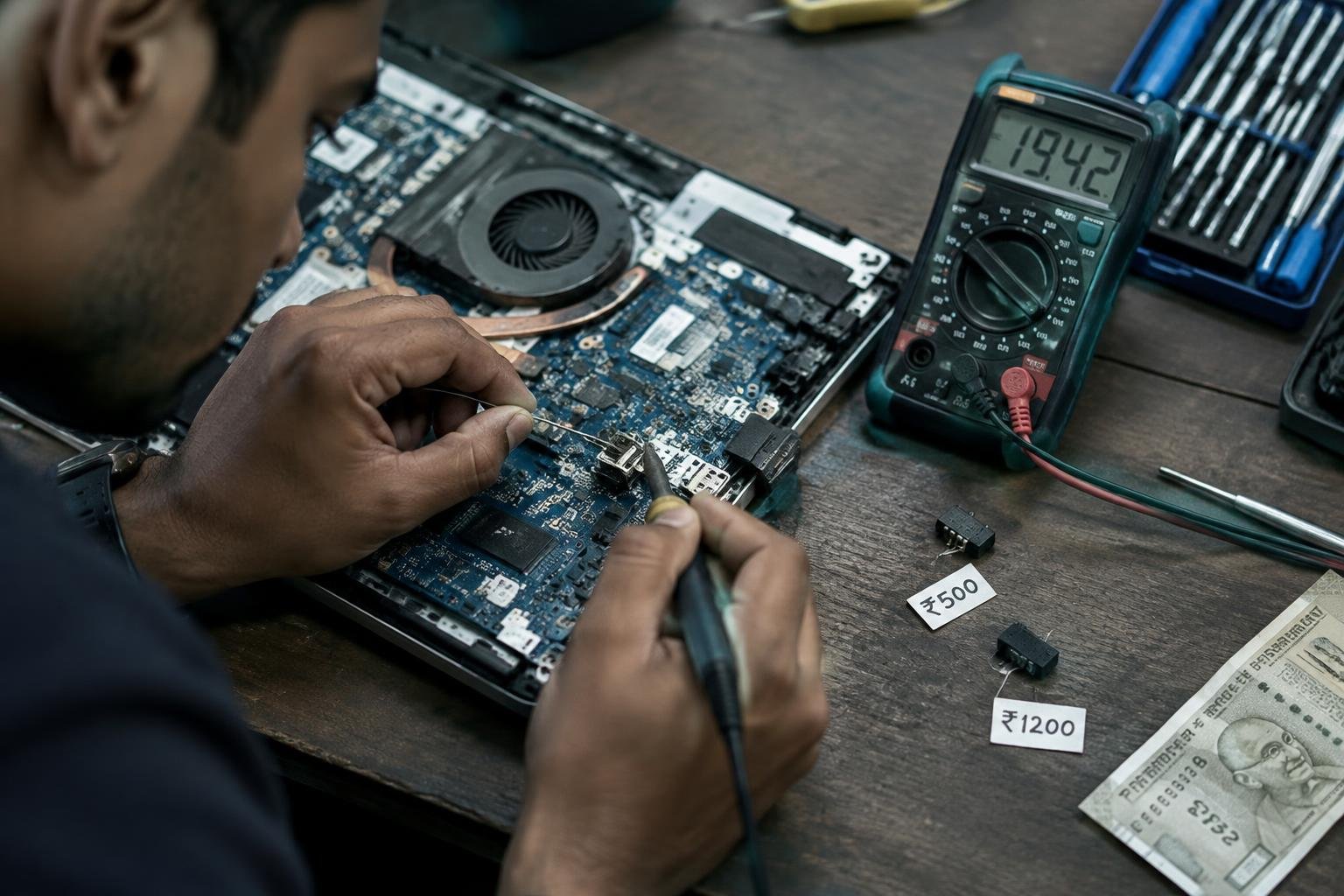
You notice your laptop isn’t charging unless you hold the plug at a certain angle. Worn ports, loose connections, or physical damage are common issues many users face. Repair costs in India vary based on brand, model, and service provider. This guide breaks down what you’ll likely pay, what influences pricing, and how to make an informed decision without overspending.
Key Takeaways:
- Laptop charging port repair costs in India typically range between ₹600 and ₹2,500, depending on the laptop brand, model, and type of damage.
- Physical port damage from rough handling or bent chargers is the most common issue, often requiring soldering or full port replacement.
- Branded service centers usually charge 30% to 50% more than local technicians, but offer better quality assurance and warranty on repairs.
- Mechanical issues like loose ports or intermittent charging can sometimes be fixed without replacing the entire port, reducing overall cost.
- Using low-quality chargers increases wear and tear on the port, leading to avoidable repairs that could have been prevented with proper accessories.
Common Types of Laptop Charging Port Issues
Physical damage to the charging port and internal circuitry failures present distinct symptoms and require different repair approaches. You can often identify physical issues by visible signs such as a loose or misaligned port, broken plastic tabs, or a wobbly DC jack. In contrast, internal failures may show no external clues but result in inconsistent charging or no power delivery despite a functional charger. Accurate diagnosis is essential to determine whether the problem lies in the port itself or deeper within the laptop’s power delivery system.
- Visible cracks or looseness in the charging port
- Inability to hold the charging cable securely
- Charging only at certain angles
- Complete failure to charge despite a working adapter
- Burning smell or discoloration near the port
| Issue Type | Common Symptoms |
| Loose or broken DC jack | Wobbly port, intermittent charging |
| USB-C/Thunderbolt port damage | Connector not seating properly, one-sided charging |
| Burnt motherboard pins | No charging, visible scorch marks |
| Internal circuitry failure | No response from laptop when plugged in |
Loosened or Broken DC Jacks
DC jacks are prone to wear when subjected to repeated plugging and unplugging, especially if the cable is twisted or pulled. You may notice the charger only works when held at a certain angle or falls out with slight movement. Over time, the solder joints anchoring the jack to the motherboard weaken, leading to misalignment or complete detachment. This type of damage is often visible upon inspection and typically requires resoldering or replacement of the entire jack assembly.
Damaged USB-C and Thunderbolt Ports
USB-C and Thunderbolt ports are compact and sensitive to physical stress or debris accumulation. You might experience charging interruptions or the laptop failing to recognize the charger altogether. Bent internal contacts or broken retaining clips inside the port prevent secure connection, and since these ports are surface-mounted, even minor damage can disrupt functionality. The issue often stems from using poorly fitting cables or applying excessive force during insertion.
Burnt Motherboard Power Pins
Power pins on the motherboard can burn due to voltage spikes, overheating, or using incompatible chargers. You may detect a burnt smell or see darkened areas around the charging circuit. When these pins fail, the laptop won’t charge even with a working adapter and intact port. This type of damage requires precise diagnosis and skilled repair, as replacing or resoldering tiny components demands advanced tools and technical expertise.
Key Factors Influencing Repair Costs in India
The final cost of repairing your laptop’s charging port depends heavily on two primary elements: the brand and model of your device, and the type of replacement parts used. High-end or less common laptops often require specialized components that are harder to source, driving up prices. Brands with proprietary designs or limited service networks may also incur higher labor and part costs. You’ll find that availability plays a major role-rare ports or boards can significantly extend both repair time and expense.
- Brand reputation and market presence affect part availability
- Proprietary designs limit third-party repair options
- Rarer models often require imported or custom-fitted components
- Genuine parts typically cost more than compatible alternatives
- Urban service centers may charge higher labor rates
Laptop Brand and Model Specificity
Your laptop’s brand directly influences repair pricing due to differences in design complexity and component availability. Premium brands like Apple or Dell often use custom-built charging ports that aren’t interchangeable across models, increasing replacement costs. Mass-market brands such as HP or Lenovo may have more standardized parts, making repairs faster and more affordable. Older or discontinued models pose challenges, as manufacturers may no longer stock parts, forcing technicians to source them from secondary markets at higher prices.
Cost of Genuine vs. Compatible Spare Parts
Choosing between genuine and compatible spare parts can significantly alter your final bill. Original equipment manufacturer (OEM) parts are engineered to match your laptop’s exact specifications, ensuring optimal performance but often come with a steeper price tag. Third-party or compatible parts, while more affordable, may vary in durability and fit. For long-term reliability, many technicians recommend genuine components, especially for high-use devices where repeated failures could increase overall costs over time.
Service Center Location and Labor Rates
Where you get your laptop repaired plays a direct role in how much you’ll pay for labor. In metropolitan cities like Delhi or Mumbai, authorized service centers often charge higher hourly rates due to increased operational costs. Smaller towns may offer lower labor fees, but technicians might lack access to branded parts or training. Independent repair shops in tier-2 or tier-3 cities can provide competitive pricing, though quality and warranty terms may vary depending on the provider’s expertise and tools.
Estimated Price Breakdown by Laptop Category
Standard Budget Laptops (HP, Dell, Lenovo)
Most budget laptops from brands like HP, Dell, and Lenovo use widely available charging port modules, keeping replacement costs relatively low. You can expect to pay between ₹800 and ₹1,800 for parts and labor at authorized or independent service centers across major Indian cities. These models often have modular designs that simplify disassembly, reducing technician time and effort. Repair prices may vary slightly depending on your location, with metro cities offering more competitive rates due to higher service competition.
High-Performance Gaming Systems
Gaming laptops such as ASUS ROG, MSI, and Acer Predator require reinforced charging ports capable of handling high wattage, making the components more expensive. Replacement typically ranges from ₹2,000 to ₹3,500, factoring in both rare connectors and the complexity of motherboard integration. Many of these systems use proprietary power delivery systems, so sourcing genuine parts takes longer and increases overall cost. You’ll also face higher labor charges due to intricate internal layouts and the need for precision during reassembly.
Apple MacBook Charging Port Replacement
MacBook charging port repairs are among the most costly due to Apple’s integrated design and exclusive components. Replacing a MagSafe or USB-C port on models like MacBook Air or MacBook Pro usually costs between ₹3,000 and ₹6,000, depending on the year and model. The entire logic board often needs removal, and only certified technicians can access original parts through Apple’s network. Even third-party shops charge premium rates because of the delicate soldering and specialized tools required for safe disassembly.
Step-by-Step Port Repair and Replacement Procedure
The technical workflow for restoring power connectivity involves a structured sequence of diagnostics, physical repair, and performance validation. Your technician begins by isolating the fault within the charging circuit, then proceeds with precise hardware intervention, ensuring compatibility and safety at each stage. Below is an overview of the core phases in the repair process.
| Phase | Action |
| Diagnosis | Check port alignment, cable response, and motherboard voltage flow |
| Repair | Desolder damaged port, clean socket, install compatible replacement |
| Verification | Test charging cycle, measure input voltage, confirm system recognition |
Initial Diagnosis and Power Testing
Start by inspecting the charging port for visible damage such as bent pins or looseness when the cable is inserted. Your technician will use a multimeter to measure voltage at the port while the laptop is connected to a known-good charger. This test confirms whether the issue lies with the port, the power adapter, or internal circuitry like the fuse or power management IC. If no current reaches the port, further probing of the motherboard’s power path follows.
Precision Soldering and Component Swapping
Once the port is confirmed faulty, the technician heats the motherboard using a rework station to carefully desolder the damaged connector. Excess solder is removed with a desoldering pump or wick to clean the pads without damaging traces. A compatible replacement port is aligned and soldered in place with precision, ensuring solid contact on all pins. The process demands steady hands and temperature control to avoid overheating sensitive nearby components.
Post-Repair Voltage Verification
After the new port is installed, the technician reconnects the battery and powers the system using the charger. Voltage at the port and across key test points on the motherboard is measured again to confirm stable power delivery. The laptop should recognize the charger, begin charging, and maintain consistent input without flickering or disconnection. Any fluctuation prompts a recheck of solder joints or connected circuitry before final reassembly.
Pros and Cons of Service Center vs. Local Technician
Choosing between an authorized service center and a local technician for laptop charging port repair in India involves balancing warranty protection with cost considerations. Official centers use genuine parts and offer structured labor warranties, preserving your device’s integrity. Independent repair shops often provide faster turnaround and lower pricing but may lack standardized quality control. Your decision should reflect your budget, timeline, and long-term usage plans.
| Factor | Service Center | Local Technician |
|---|---|---|
| Warranty Coverage | Repairs covered under manufacturer terms; valid only if original parts used | No formal warranty; depends on shop policy |
| Repair Cost | Higher due to branded parts and certified labor | Generally 30-50% lower than official centers |
| Part Quality | Genuine OEM or authorized components | Mixed quality; often generic or recycled ports |
| Turnaround Time | 2-7 days depending on part availability | Often completed within 24-48 hours |
| Technician Certification | Factory-trained and brand-certified | Skills vary; no standardized certification |
| Diagnostic Accuracy | Precise using brand-specific tools | Relies on experience; may miss underlying issues |
| Impact on Device Warranty | No negative effect if under warranty | May void remaining manufacturer warranty |
| Transparency | Detailed billing and repair reports | Limited documentation; informal communication |
| Location Accessibility | Limited to urban centers and major cities | Widely available even in smaller neighborhoods |
| Customer Support | Structured follow-up and escalation channels | Dependent on individual shop responsiveness |
Reliability and Warranty of Authorized Centers
You can expect consistent reliability when opting for an authorized service center. These facilities employ trained technicians who follow manufacturer protocols, ensuring the repair meets strict quality standards. Genuine replacement parts are used, which maintains compatibility and reduces the risk of future failures. Most repairs come with a formal warranty, typically covering both parts and labor for 30 to 90 days, giving you documented protection and peace of mind.
Cost-Efficiency and Speed of Local Shops
Your repair bill is likely to be significantly lower at a local technician’s shop, especially in metropolitan areas like Delhi or Chennai where competition keeps prices competitive. Many independent repairers source affordable aftermarket ports and complete the job within a day. You avoid lengthy diagnostic queues and rigid appointment systems. While savings are appealing, confirm the technician’s track record before handing over your device.
Potential Risks of Unofficial Repairs
Repairing your laptop at an uncertified workshop may lead to long-term complications. Poor soldering or misaligned ports can damage the motherboard or disrupt power delivery. Some local shops use low-grade components that fail prematurely. If your laptop is still under manufacturer warranty, third-party repairs could void it entirely. Always weigh immediate cost benefits against possible future expenses from substandard workmanship.
Tips for Maintaining Charging Port Longevity
Proper handling of your laptop’s charging port directly impacts its lifespan and performance. Over time, rough usage can lead to loose connections, bent pins, or complete port failure. You can avoid unnecessary repair costs and maintain consistent charging efficiency by adopting simple yet effective habits. Follow these best practices to protect one of your device’s most frequently used components.
- Always grip the plug, not the cable, when unplugging
- Align the connector straight before inserting
- Avoid forcing the plug into the port
- Keep the port area free from dust and debris
- Use the correct charging adapter for your laptop model
Safe Cable Insertion and Removal Habits
How you plug and unplug your charger affects the port’s structural integrity. Always insert the connector straight without tilting or wobbling, as misalignment can bend internal pins. When removing the cable, grasp the plug firmly and pull it out with steady pressure-never yank it by the cord. Repeated stress from improper handling weakens the port’s soldering on the motherboard, eventually causing charging interruptions or complete failure.
Importance of Using Original Power Adapters
Your laptop is designed to work with specific voltage and current levels, which original power adapters deliver consistently. Third-party chargers often vary in output or lack proper shielding, increasing strain on the charging port and internal circuitry. Over time, this mismatch can degrade port contacts or trigger short circuits. Sticking to genuine adapters not only protects the port but also ensures stable power delivery, reducing long-term wear and potential damage.
Routine Cleaning and Debris Removal
Dust, lint, and pocket debris often accumulate in the charging port, especially if you use your laptop on sofas or beds. Buildup can block proper connector seating, leading to intermittent charging or overheating. Power off your device and inspect the port weekly using a flashlight. Use a dry, soft brush or compressed air to gently remove particles-never insert metallic objects or apply liquids. Keeping the port clean preserves conductivity and prevents unnecessary physical stress during charging.
Final Words
You now have a clear understanding of what influences laptop charging port repair costs across India, from the type of damage to the choice of service provider. Whether you own a budget notebook or a high-end ultrabook, knowing the average price range and repair process helps you avoid overpaying or accepting substandard fixes. Opting for certified technicians or reputable local experts can save both money and downtime. You’re in a stronger position to make informed decisions-balancing cost, quality, and reliability-ensuring your laptop stays powered and functional for months ahead.
FAQ
How much does laptop charging port repair cost in India?
Laptop charging port repair in India typically costs between ₹800 and ₹3,500, depending on the brand, model, and type of port. Higher-end laptops like MacBooks or gaming models may exceed this range due to expensive parts and specialized labor.
How long does it take to fix a charging port on a laptop?
Most laptop charging port repairs take 2 to 4 hours when spare parts are available. Delays can occur if the component needs to be ordered, especially for older or imported models, extending the wait time to a few days.
Is it worth repairing a charging port on an old laptop?
Repairing a charging port on an old laptop is worth it if the device otherwise performs well and the repair cost is under half the price of a replacement. However, if the motherboard is damaged or the laptop is obsolete, investing in a new device may be more practical.
Can a loose charging port damage my laptop further?
Yes, a loose charging port can cause intermittent power supply and lead to battery or motherboard damage over time. Continued use without repair may result in permanent circuitry issues, especially if arcing or overheating occurs at the connection point.
What are common mistakes to avoid when getting a charging port repaired?
Using non-genuine parts or choosing an inexperienced technician can lead to poor soldering and repeated failures. Always verify the technician’s expertise, especially for laptops requiring surface-mount soldering, as improper handling can damage surrounding components.
 Previous Post