



Laptop Battery Replacement Guide India
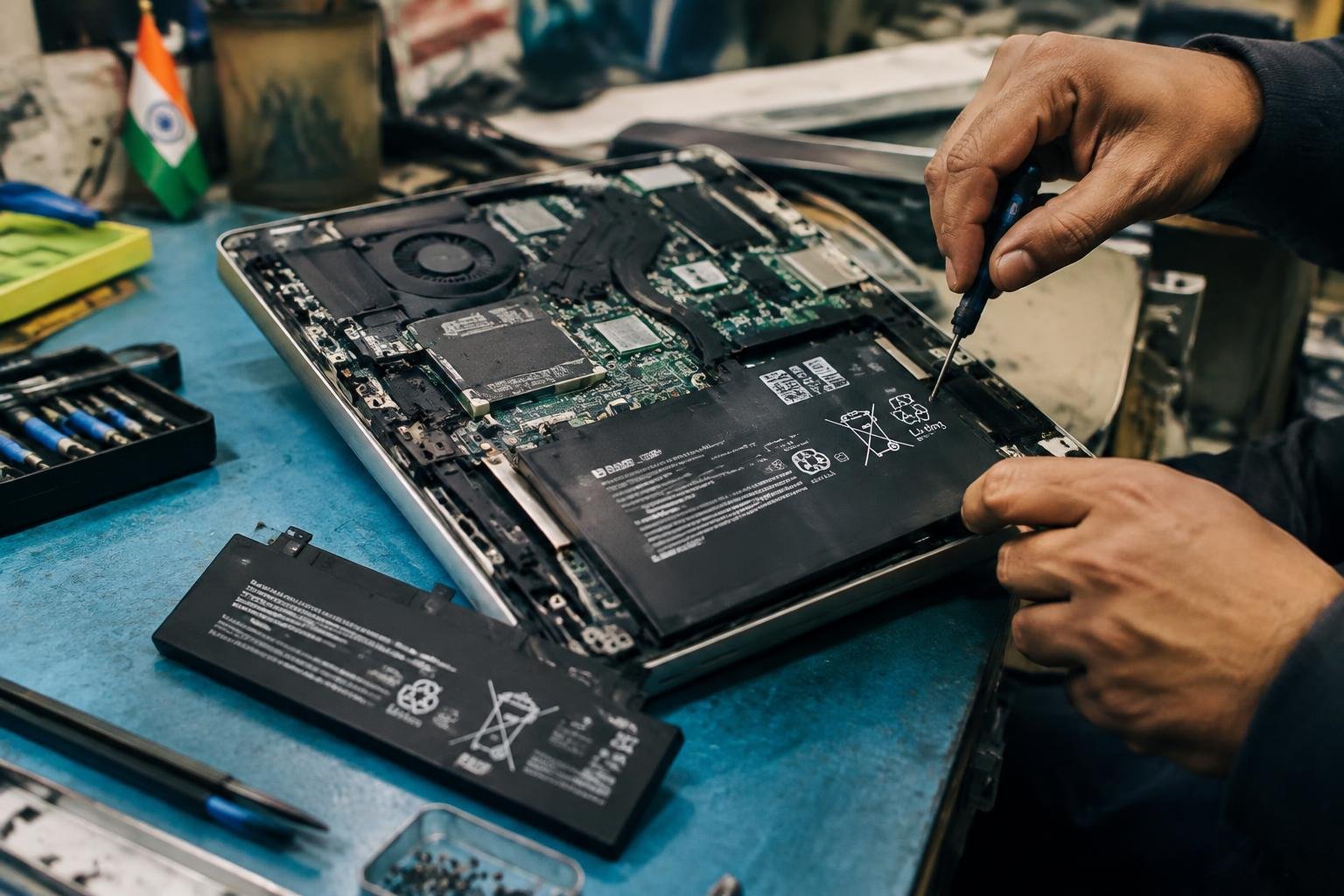
A laptop that shuts down during a power cut or loses charge within minutes often has a worn battery, not a faulty charger. In India, replacement depends on your laptop’s exact model, battery part number, and whether its pack is removable or fitted inside the case. Matching those details helps you avoid an incompatible battery or unnecessary repair.
Key Takeaways:
- Match the replacement battery to the laptop’s exact model and battery part number; connector shape, voltage, and dimensions must also match.
- Choose an original manufacturer battery or a reputable compatible battery with clear seller details, a warranty, and applicable BIS compliance information.
- Many modern laptops use internal lithium-ion batteries, which require opening the case and disconnecting the battery cable before removal.
- Use a technician for swollen batteries, soldered connectors, or models with difficult-to-remove covers; stop using a swollen battery and arrange safe service.
- After installation, confirm that the battery is detected, charges normally, and reports a reasonable health status in the laptop’s diagnostics or operating system.
Types of Laptop Batteries in India
Across Indian laptop models, battery chemistry, shape, connector and firmware support determine whether a pack fits and works correctly. Two batteries with similar dimensions are not necessarily interchangeable: manufacturers assign model-specific part numbers, and a matching connector alone does not confirm compatibility. Retail listings commonly distinguish original, compatible and refurbished packs, while the laptop’s service tag or underside label identifies the model family needed to understand those categories.
| Battery type or option | Construction or source | Compatibility detail |
|---|---|---|
| Lithium-ion | Cells arranged in a rigid or shaped pack | Pack dimensions, connector and part number must match |
| Lithium-polymer | Thin pouch cells suited to slim chassis | Shape and mounting points are model-specific |
| Original | Supplied under the laptop brand | Part number is matched to supported models |
| Compatible | Third-party replacement pack | Must specify the laptop’s exact model or battery code |
| Refurbished | Previously used pack with repaired or replaced cells | Fit may match, but cell history and pack condition vary |
Lithium-ion and lithium-polymer batteries
Lithium-ion packs use cylindrical or prismatic cells in a casing, while lithium-polymer packs typically use flat pouch cells that fit thinner laptop designs. Both rely on a battery management system to monitor charging and temperature, but their physical layouts and connectors differ by model. Your laptop’s internal space, mounting points and battery part number therefore matter as much as the chemistry; a pouch pack from a slim notebook is not a substitute for a rigid pack with a different connector.
Original, compatible, and refurbished options
Original batteries carry the laptop maker’s branding and are specified for particular model families or part numbers. Compatible packs come from third-party manufacturers, so you need a listing that names your exact laptop model or the code printed on its existing battery. Refurbished options reuse a pack or its casing, sometimes with replacement cells; appearance alone does not reveal cell age or repair quality. These categories describe source and condition, not a universal fit across laptops.
Factors for Choosing a Replacement
Choosing a battery involves more than matching the laptop’s brand name. You need to weigh physical fit, electrical specifications, usable capacity, warranty coverage, and the seller’s track record. A compatible battery protects the laptop from charging faults, while a suitable capacity supports the runtime you expect from your daily workload. In India, availability and after-sales support also vary by seller, so the product listing and warranty terms matter as much as the quoted price.
Laptop model and battery specifications
Start with the exact model code printed on your laptop’s underside or shown in its system information, then match it to the battery’s part number. Check voltage, connector type, shape, and mounting points, since batteries sold for similar-looking models are not always interchangeable. Capacity, listed in watt-hours (Wh), indicates stored energy; a higher figure is suitable only when the battery is explicitly rated for your model. A Dell Inspiron model code and its battery part number provide a more reliable match than “Inspiron compatible.”
Price, warranty, and seller reliability
Price differences often reflect cell quality, brand, capacity, and warranty coverage, so compare the full listing rather than choosing the lowest quote. Read whether the warranty covers manufacturing defects, how long it lasts, and whether the seller handles claims directly or refers you to the manufacturer. Prefer an established Indian retailer or authorised service provider that issues a GST invoice and publishes a clear return policy. Keep the invoice and packaging details, since sellers commonly request them for warranty claims.
- Look for a BIS mark where applicable to the product.
- Check that the listing identifies the battery chemistry, such as lithium-ion.
- Confirm whether the quoted price includes GST and delivery.
Pros and Cons of Replacement Options
Your choice of replacement battery affects runtime, reliability, and the balance between cost and manufacturer support. Original, compatible, and refurbished units each suit different circumstances: a recent laptop used for demanding work places a different value on predictable performance than an older device kept for occasional tasks. The distinctions are clearest when you separate the battery’s source and condition, since a compatible battery is not necessarily refurbished, and an original unit is not necessarily new.
| Option | Main advantage | Main drawback |
|---|---|---|
| Original, new | Designed to the laptop maker’s specifications | Can cost more than compatible alternatives |
| Compatible, new | Often offers a lower-cost replacement | Performance and support vary by manufacturer |
| Refurbished | May suit an older laptop with limited use | Prior wear can reduce runtime and service life |
Original versus compatible batteries
Original batteries come from the laptop manufacturer or its authorised supply chain, with cell capacity and control circuitry specified for the model. A compatible battery is produced by a third party to fit the same laptop, and its quality depends on the cells, protection circuit, and build standards used. You generally get clearer model support with an original unit, while a reputable compatible option may cost less; differences in runtime and warranty terms depend on the maker.
New versus refurbished batteries
New batteries contain cells that have not been used in a laptop, so their capacity has not been reduced by everyday charge cycles. Refurbished units have been recovered, tested, or reconditioned, but testing does not restore cells to their original condition. You may find one suited to an older laptop used as a backup, although its remaining runtime and service life are less predictable. A new lithium-ion pack starts without prior charge-cycle wear.
Step-by-Step Battery Replacement
Work through the replacement in a controlled sequence, using your laptop’s service manual to identify the battery location, connector type, and fastener positions. Shut down the computer fully, disconnect its charger and peripherals, and keep screws grouped by their original locations. Battery designs differ: a removable pack releases from external latches, while an internal battery requires access through the base cover. Follow the correct procedure for your model rather than forcing a connector or cover.
Tools and safety precautions
Prepare a correctly sized Phillips or Torx screwdriver, a plastic opening tool, and a non-metallic spudger; use an antistatic wrist strap or touch grounded metal before handling components. Work on a clean, dry, non-conductive surface, with the laptop powered off and unplugged. Avoid metal pry tools near the battery and motherboard. If the battery is swollen, punctured, hot, or leaking, stop the replacement and arrange professional service rather than pressing or bending the pack.
Removing the old battery and fitting the new one
Release the base-cover clips with a plastic opening tool, then remove the screws securing the battery. Disconnect its cable by pulling the connector horizontally from its socket, not by tugging on the wires. Lift the old pack without bending it, position the replacement with its label and screw holes aligned, and reconnect the cable firmly. Reinstall the battery screws and base cover, keeping each fastener in its original position and avoiding overtightening.
| Step | Tool or technique | Key detail |
|---|---|---|
| Open the base | Plastic opening tool | Release clips without damaging the cover |
| Remove fasteners | Phillips or Torx screwdriver | Keep screws grouped by location |
| Disconnect the battery | Non-metallic spudger | Pull the connector, not its wires |
| Fit the replacement | Model-compatible battery | Align the cable and screw holes |
Tips for Buying a Battery in India
Before placing an order, match the replacement to your laptop’s exact model number and battery part number, not just its screen size or brand. Indian retailers range from authorised service centres to marketplace sellers and local repair shops, so confirm who will supply the battery and who will handle a fault claim. Keep the invoice, packaging and written warranty terms together; these records establish your purchase date and seller if a dispute arises.
Checking authenticity and return policies
Ask the seller for the battery’s manufacturer, part number and a clear photograph of its label, then match those details with your laptop’s service documentation. Genuine OEM stock and reputable compatible batteries should carry legible specifications and traceable seller details; vague claims such as “original quality” do not establish authenticity. Read the return policy for opened or installed batteries, dead-on-arrival claims and the deadline for reporting defects. Save the product listing and invoice with the warranty card.
Comparing prices and service options
Compare the total cost, including GST, delivery and fitting, rather than judging a listing by its displayed price alone. An authorised service centre typically provides a documented part and installation, while an independent technician may offer a lower fitting charge; confirm which party covers labour if the battery is faulty. Ask whether the quoted battery is OEM or compatible, and check the warranty duration and claim process in writing. A complete quote should identify the part number and fitting charge.
- Confirm whether the invoice includes the seller’s GSTIN.
- Check that the warranty terms name the issuing business.
- Ask whether installation voids the return window.
Battery Care and Troubleshooting Tips
Battery performance depends on temperature, charge levels, and the laptop’s power settings, so everyday patterns matter as much as occasional troubleshooting. Use your manufacturer’s battery-health utility to review capacity and charge-cycle information, then match any changes to what you observe during normal use. In India’s warmer months, avoid leaving a running laptop on a bed or inside a parked vehicle, where trapped heat can raise battery temperature.
Charging and storage practices
Keep the laptop on a hard, ventilated surface while charging, and use its supplied adapter or a compatible charger with the specified voltage and wattage. If your model offers a charge limit, set it near 80% when it stays plugged in for long periods. For storage lasting several weeks, shut the laptop down with a moderate charge rather than leaving it empty; check the manufacturer’s guidance for the recommended storage level.
Signs of failure and basic checks
Unexpected shutdowns, sharply reduced runtime, or a battery percentage that jumps after restarting can indicate a worn cell or inaccurate charge reporting. Check battery status in Windows with the built-in battery report, or use the diagnostic utility provided for your laptop model. Inspect the case for swelling and stop using the laptop if the touchpad or bottom panel has lifted; a swollen battery needs professional handling, not pressure or puncturing.
- Close high-drain apps listed in your system’s power-usage view.
- Lower screen brightness when working away from a socket.
- Disconnect USB accessories that draw power while the laptop is asleep.
To wrap up
Choosing a replacement battery in India comes down to matching the laptop’s exact model and battery part number, then verifying that the seller provides a suitable warranty and clear return terms. Use an authorised service centre when your device is under warranty or requires complex disassembly; for straightforward replacements, a qualified technician should use the correct tools and follow the manufacturer’s safety guidance. After installation, confirm that the battery charges normally and appears correctly in the operating system.
FAQ
How much does laptop battery replacement cost in India?
Laptop battery replacement in India can cost from a few thousand rupees to considerably more, depending on the laptop model and battery type. The total may also include labour, so check whether the quoted price covers installation and whether the battery is new, compatible, or original.
How long does it take to replace a laptop battery?
A replacement can take a few minutes if the battery is user-accessible, or longer if the laptop must be opened. Service time depends on the model, the technician’s process, and whether the correct battery is in stock.
Is it safe to replace a laptop battery at home?
Replacing a removable battery is generally straightforward, but opening a laptop carries risks of damaging connectors or other components. Follow the manufacturer’s model-specific instructions, disconnect power, and stop if the battery is swollen or difficult to remove.
What mistakes should I avoid when buying a replacement laptop battery?
Avoid buying a battery based on appearance alone, since the model number, connector, and specifications must match your laptop. Also check the seller’s return terms and warranty, and be cautious of unusually low prices or unclear claims about the battery’s condition.
Can I use my laptop without its battery instead of replacing it?
Many laptops can run from their power adapter without a battery, but this depends on the model and the adapter’s condition. This is a temporary alternative, not a portable solution, and a power interruption can shut the laptop down if it has no working battery.
Is laptop battery replacement worth it for an older laptop?
Replacement can be worthwhile if the laptop still meets your needs and the battery costs less than a practical alternative, such as repairing or replacing the computer. Consider the laptop’s overall condition and the replacement battery’s warranty, not just its price.
How do I know if my laptop battery needs replacing?
A battery that holds much less charge than before, shuts the laptop down unexpectedly, or is visibly swollen may need attention. Battery wear can also cause short runtime, but charging faults or software issues may produce similar symptoms, so check the manufacturer’s diagnostics where available.
 Previous Post